
Finding users in AD Phonebook just became faster and more forgiving.
With Fuzzy Search, you can now locate users even if the name is incomplete or contains small typos — no need for exact matches anymore.
With Fuzzy Search, you can now locate users even if the name is incomplete or contains small typos — no need for exact matches anymore.
Available as of December 15, 2025 (v4.0.1.1+), this feature makes everyday directory searches smoother and more efficient.
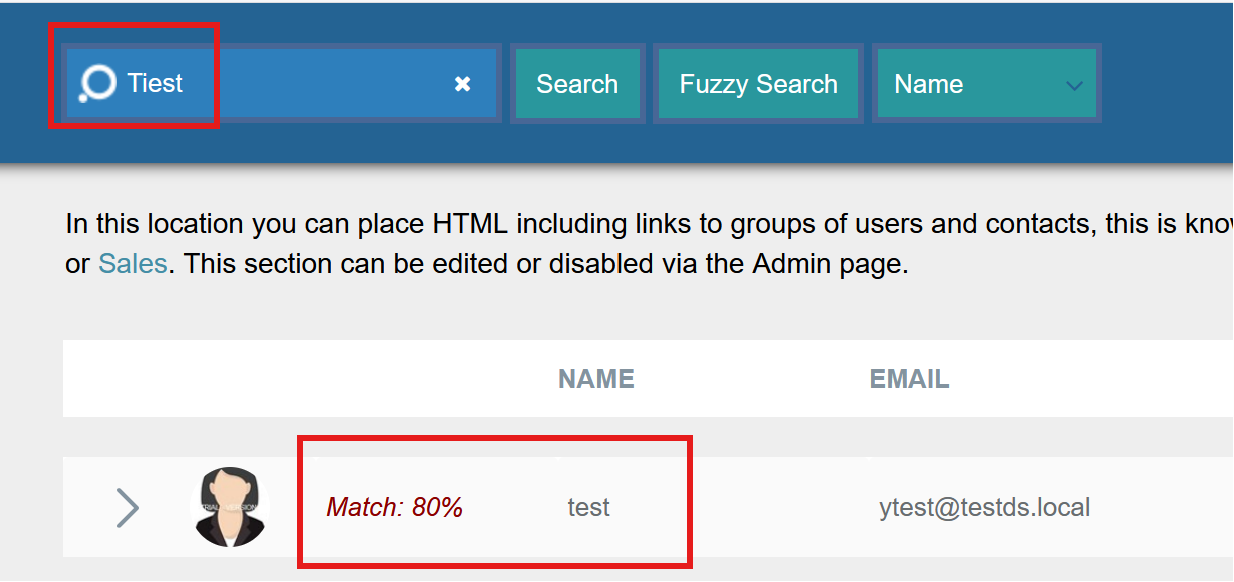
⚡ Smarter, More Flexible Search
When fuzzy search is enabled, AD Phonebook evaluates how closely a search term matches user data and returns results based on a similarity score — not just exact text matches.
This means:
-
Partial names still return relevant results
-
Minor spelling mistakes no longer block searches
-
Users are found faster, with less effort
⚙️ Easy to Configure
Fuzzy search is managed from the Admin page → Search Filters section, where administrators can:
-
Enable or disable fuzzy search
-
Configure the minimum match score
We recommend a threshold of 80%, which provides the best balance between accuracy and flexibility.
You can also reset the fuzzy search cache, ensuring search results refresh immediately after updates.
📊 Transparent Results (When You Want Them)
When fuzzy search is active, a match score column can be displayed in the results table. This column is fully optional and can be toggled from the Column Data section in the Admin page.
Disabling the match score keeps results visually identical to strict search — while still benefiting from fuzzy matching in the background.
🗓 Available as of December 15, 2025 (v4.0.1.1+)
— Dovestones Software