• Skip to primary navigation
  • Skip to content
  • Skip to footer
Dovestones Software Logo

Dovestones Software

Active Directory Software and Services

  • Products
    • AD Toolset Bundle
    • AD Bulk Users
    • AD Bulk Contacts
    • AD Reporting
    • AD Bulk Export
    • AD Photos
    • AD Find and Replace
    • True Last Logon
    • Active Directory Self Service
    • AD Self Password Reset
    • AD Phonebook
    • AD Self Update
  • Solutions
    • Active Directory Self Service
    • Import users into Active Directory
    • Import Active Directory photos into SharePoint
    • Update users that already exist in Active Directory
    • Report on Active Directory Users
    • Allow users to reset their own passwords.
    • Allow employees to update their own details Active Directory
  • Testimonials
  • Downloads
  • Purchase
    • Pricing & Purchase Online
    • Resellers
    • Quote Request
    • Purchase Orders
  • Support
    • Frequently Asked Questions (FAQs)
    • Documentation
    • Support Request Form
    • Custom Development Request Form
    • Uninstall Products
    • Find my license key
    • Blog
    • Videos
  • About Us
    • Enquiry Form
    • End User License Agreement
    • Privacy Policy

🚀 Built-in Templates Are Now Available in AD Bulk Users

Feb 2, 2026 AD Bulk Users, AD BULK USERS

We’ve introduced built-in Templates in AD Bulk Users — making bulk user operations faster, cleaner, and easier than ever.
As of October 26, 2025 (v6.0.0.6+), you can generate and edit template data directly inside the application, without relying on external files.

đź§© Work Directly in the Grid

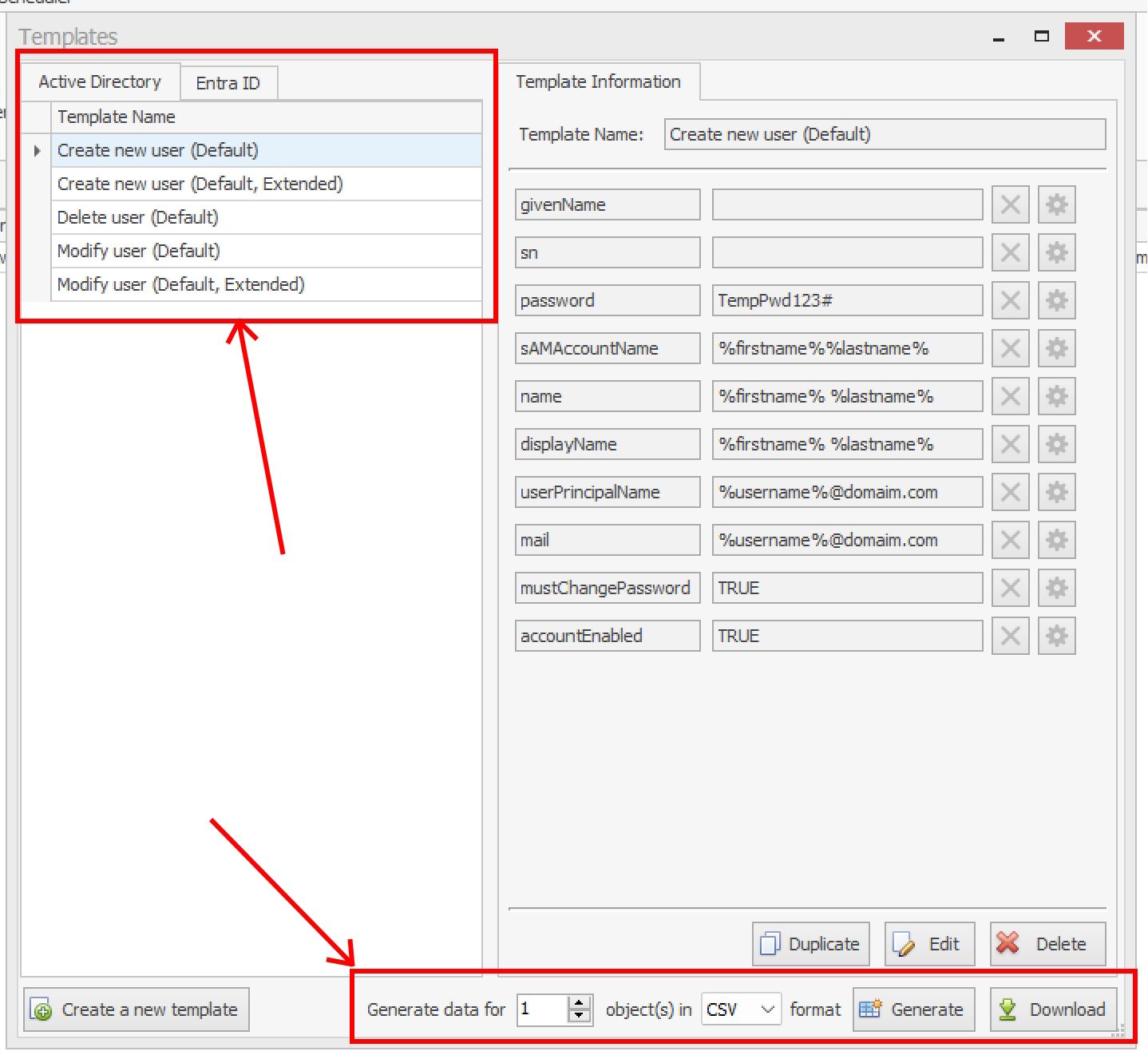
Templates let you generate structured data right in AD Bulk Users:
  • Choose how many records to generate
  • Instantly get a pre-filled data grid
  • Edit values directly in the table
You can move quickly between fields using your keyboard, making large updates fast and efficient — all without leaving the app.
Once your data is ready, simply click Validate or Start to proceed with the operation.


đź“‹ Ready-to-Use & Fully Customizable Templates

The application includes five built-in templates covering the most common scenarios:
  • Create a new user
  • Create a new user (Extended)
  • Update an existing user
  • Update an existing user (Extended)
  • Delete a user
You can customize any default template or create new ones from scratch.
Need a variation? Use Duplicate Template to quickly build on an existing structure.


⚙️ Dynamic Values with Wildcards

Templates also support wildcards, allowing values to be generated or substituted dynamically during execution.
Simply click the gear icon next to a field to insert placeholders — perfect for creating flexible, reusable templates that adapt to different scenarios.


đź—“ Available as of October 26, 2025 (v6.0.0.6+)

— Dovestones Software

Footer

Dovestones Software

Copyright 2005 – 2023 © Infoopia Inc.
All rights reserved.

Registered office:

Infoopia Inc.
PO Box 93383
Newmarket Ontario
L3X 1A3
Canada

Phone (voice mail):
Toll-Free 1.877.335.8909
Outside of US/Canada +1.647.478.8078

Our Newsletter

Subscribe to our newsletter to receive the latest updates. You can review our privacy policy here.